


e-Ledger submission deadlines fall in the fourth month after the relevant period. Income tax taxpayers upload their berats by the 10th, corporate tax taxpayers by the 14th. On the quarterly option, the deadline is the 10th or 14th of the month after the provisional tax return. If the last day lands on a holiday, the right extends to the first following business day.
Before we go further, two terms this article leans on. e-Ledger (e-Defter) is Turkey's mandatory electronic bookkeeping system, run by the Turkish Revenue Administration (GİB). A berat (ledger certificate) is the electronically signed or financially sealed summary of your e-Ledger that you file for approval.
Author: e-Defter PRO Content Team. A team that tracks the berat process of hundreds of taxpayers in the field every month.
Last period a client's financial advisor called us. His voice was tense. A taxpayer's berat upload had slipped by a single day. The files were ready, everything in the software was set. But the upload had never happened.
One. Single. Day.
In the GİB system the deadline had long since passed. We will tell the end of that call below, in the penalty section. First, let us lay out a clear calendar. If you skipped the basics, like what e-Ledger is and which ledgers get uploaded, our e-Ledger explainer is a good place to start.
Key Takeaways
- On the monthly option, the last day is the fourth month after the relevant month: the 10th for an income tax taxpayer, the 14th for corporate tax and other taxpayers.
- On the quarterly option, the deadline runs to the 10th or 14th of the month after the one in which the provisional tax return was filed.
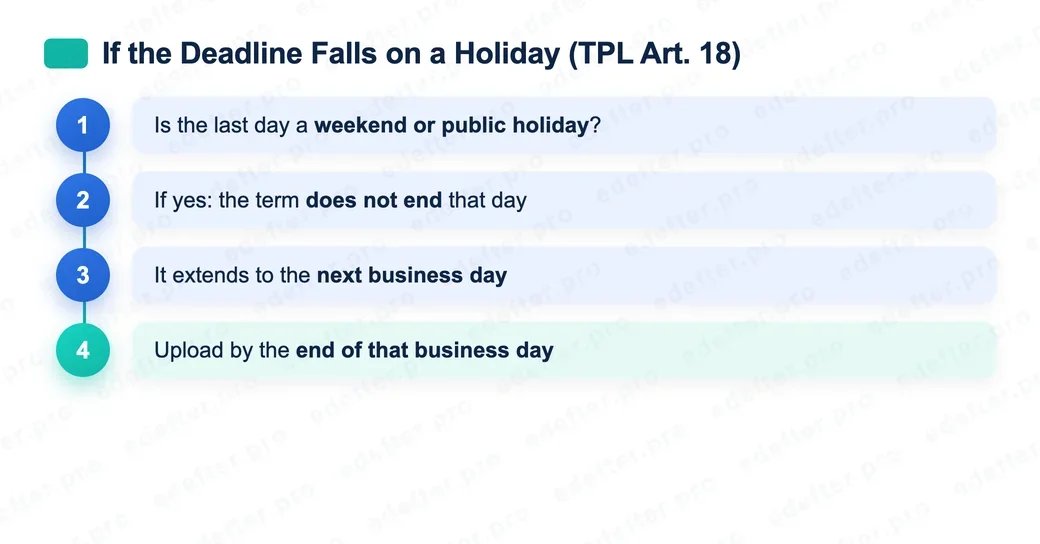
- If the last day falls on a public holiday or a weekend, the deadline extends to the first following business day (Tax Procedure Law, VUK, Article 18).
- The choice between monthly and quarterly is made by 31 January each year. A taxpayer who does not declare is treated as monthly.
- In 2026, the deadlines for the January, February, and March periods were extended to 30 June 2026 (GİB, VUK Circulars No:198 and No:202).
When is the e-Ledger submitted?
The e-Ledger and its berat are submitted in the fourth month after the period they belong to. For a natural person, that is an income tax taxpayer, the last day is the 10th of the month. For corporate tax and other taxpayers it is the 14th. This rule applies to the monthly upload option. The quarterly option is different. We will handle that separately in a moment.
Knowing which group you are in is critical here. Sole proprietorships and self-employed professionals are on the income tax side, so the 10th. Legal entities such as joint-stock and limited companies are on the corporate tax side, so the 14th. If you are not sure, your financial advisor can tell you in a minute. Also remember that two berats are produced each month: one for the journal (daybook) and one for the general ledger.
The most common mistake here comes from remembering an old rule. Years ago the deadline was known as "the end of the third month after." That no longer holds. The current basis is the Electronic Ledger General Communiqué and GİB's 2020 announcement. When you ask AI tools or old blog posts, you may still get the third-month answer. Be careful, because that shifts you by a full day.
What is the 2026 monthly e-Ledger submission calendar?
The 2026 monthly submission calendar is built on the 10th and 14th of the fourth month after each period. The table below shows every period for income tax and corporate tax taxpayers. Days that fall on a weekend or a holiday have been shifted to the first following business day.
| Period (2026) | Income Tax (last day) | Corporate Tax (last day) |
|---|---|---|
| January | 11 May (extended to 30 June) | 14 May (extended to 30 June) |
| February | 10 June (extended to 30 June) | 15 June (extended to 30 June) |
| March | 10 July | 14 July |
| April | 10 August | 14 August |
| May | 10 September | 14 September |
| June | 12 October | 14 October |
| July | 10 November | 16 November |
| August | 10 December | 14 December |
| September | 11 January 2027 | 14 January 2027 |
| October | 10 February 2027 | 15 February 2027 |
| November | 10 March 2027 | 15 March 2027 |
| December | Tied to the annual return | Tied to the annual return |
There is a small but important distinction. What you upload to GİB is not the ledger itself, but its berat. The berat is the electronically signed or financially sealed summary of the ledger. Your ledger files stay with you. All that goes to GİB is this approval summary. And it is this berat upload that people miss on the last day.
The dates were calculated according to the legal rule and the 2026 public holiday calendar. Still, dates move. For the shifted days, we recommend confirming with GİB announcements in the week you plan to upload. You can also follow the latest status on our e-Ledger calendar page, which we keep up to date. For berat production, the preference, and penalties, our e-Ledger berat upload guide is a more detailed resource.
What are the 2026 quarterly (provisional tax) e-Ledger deadlines?
On the quarterly option, berats cover a provisional tax period and are uploaded in the month after the return is filed. The last day is again the 10th for income tax and the 14th for corporate tax. In 2026, the fourth provisional period is not a separate upload. The final quarter is tied to the annual return. The table below summarizes the three periods.
| Provisional tax period (2026) | Income Tax | Corporate Tax |
|---|---|---|
| January, February, March | 10 June (extended to 30 June) | 15 June (extended to 30 June) |
| April, May, June | 10 September | 14 September |
| July, August, September | 10 December | 14 December |
| October, November, December | Tied to the annual return | Tied to the annual return |
Let an example make it clear. The second provisional tax period covers April, May, and June. The return is filed in August, and the berat upload deadline is the 10th or 14th of September. So three months of records fit into a single upload.
The quarterly option makes life easier for financial advisors, because it gathers many periods into one go. It has one downside. When you miss it, not a single period but three months of berats are at risk at once. That is why the last-day check matters even more in offices that make few but high-value uploads.
Should I choose monthly or quarterly?
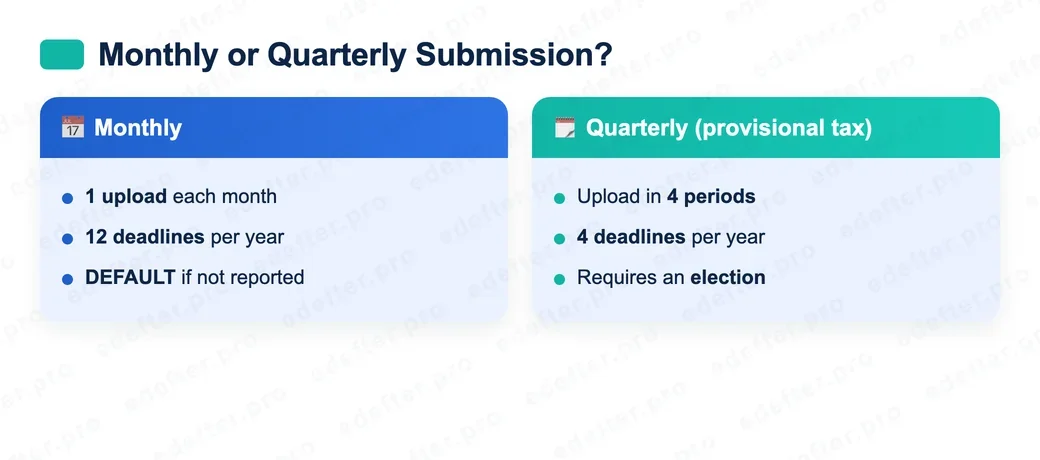
The choice is entirely yours, and it is declared through the e-Ledger application by 31 January each year. A taxpayer who does not declare is automatically treated as monthly. For 2026, since 31 January fell on a Saturday, the last day was Monday, 2 February 2026.
So which makes more sense? Our observation in the field points this way. For businesses with high transaction volume and records that flow in order, monthly submission catches errors early. It means twelve small checks a year. Quarterly, on the other hand, brings less operational load for offices with a small number of taxpayers. But each upload carries a bigger responsibility. The right answer depends on who checks your ledger and how often.
What happens if I miss the deadline?
Missing the deadline means the berat was not uploaded on time. That creates the risk of an administrative penalty, and here most guides oversimplify. The truth is messier: the penalty is disputed. Depending on the circumstances, it may be treated as an irregularity under VUK Article 352, or as a special irregularity under VUK Repeated Article 355. There is no single definitive figure. Under the Repeated Article 355 route, the 2026 special irregularity base sits around 35,000 TL for a first-class merchant (VUK General Communiqué Series No:588, Official Gazette 31 December 2025). But that is only the base for that one route, not a settled amount. Which article applies, and whether it lands separately on each ledger, shifts with administrative interpretation. So do not anchor your planning on a single number.
Now back to the phone call from the opening. That taxpayer's files were ready. The journal and general ledger berats had been created. The upload step had been forgotten. A single day passed. The deadline closed in the GİB system. The result was a high-value penalty notice across two separate berats.
The lesson here is not the number itself. The lesson is this: tracking the date alone is not enough. You need a check that confirms the file was actually uploaded.
There are also options if a penalty notice arrives. You are not without moves. Depending on the situation, paths such as an invitation to explain, settlement, or a penalty reduction may come into play. These depend on the circumstances of the case and the taxpayer class, so rather than promising anything definite, we recommend you assess it with your advisor. For how the penalty is calculated and the routes for objection, you can look at our detailed e-Ledger penalties analysis.
Were the 2026 e-Ledger deadlines extended?
Yes, the deadlines for the first periods of 2026 were extended. With VUK Circulars No:198 and No:202, GİB moved the upload deadlines for the January, February, and March 2026 periods to Tuesday, 30 June 2026 (GİB e-Ledger announcements). Extensions like this may not happen every year. A period granted extra time is no precedent for the next.
Let us give a warning. Do not rely on the extension. In the field, we most often see taxpayers who leave it to the last day and wait get into trouble. That is why in e-Defter PRO we send reminders at 15, 7, 3, and 1 day before the upload. According to our own usage data, the vast majority of uploads are completed in exactly these four windows, while the minority squeezed into last-day traffic runs into the most problems. Those who upload early never even see the last-day load on the GİB system. This section is updated as the rules change. Follow the latest status from the last-updated line at the bottom of the page.
How do you avoid missing the deadline with e-Defter PRO?
The most practical way is to hand the deadline over to a system rather than to memory. e-Defter PRO sends automatic reminders for approaching berat dates and checks whether the upload was actually made. That way the "files ready but upload not done" situation from the opening disappears.
It is especially useful in financial advisor offices with many taxpayers. Instead of keeping each taxpayer's separate calendar in mind, the approaching deadlines are gathered on a single screen. If you are curious about the technical side, you can see the flow on our GİB integration page.
What should you do this week?
Do one thing this week: find the row that fits you in the table above and write the nearest last day in your calendar. Then set a reminder for that date, ideally a few days earlier. If you are unsure, talk to our expert team.